> For the complete documentation index, see [llms.txt](https://docs.qpoint.io/llms.txt). Markdown versions of documentation pages are available by appending `.md` to page URLs; this page is available as [Markdown](https://docs.qpoint.io/getting-started/qtap/configuration/metrics.md).
# Metrics
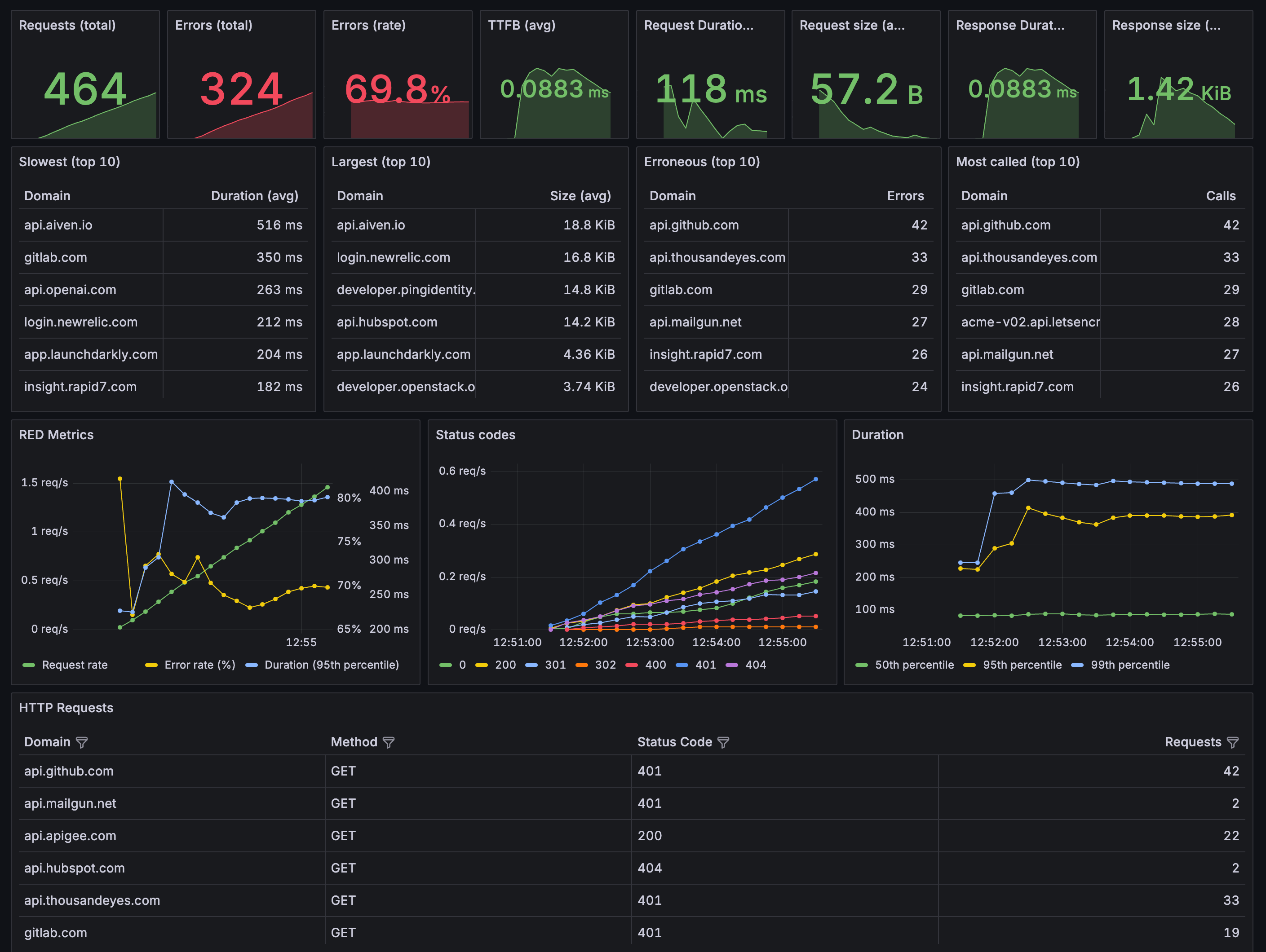
Qtap exposes Prometheus-compatible metrics endpoints for monitoring HTTP traffic activity and agent health. These can be used to build your own dashboards with Grafana. We have a sample Grafana dashboard available [here](https://github.com/qpoint-io/qtap/blob/main/examples/dashboards/qtap-http-overview.json).
{% hint style="warning" %}
**REQUIRED**: HTTP-level metrics (requests, responses, latency) require the `http_metrics` plugin in your stack configuration. Without this plugin, only connection-level metrics will be available. See [Configuration](#configuration-requirement) below.
{% endhint %}
## Endpoints
Qtap provides two metrics endpoints on `localhost:10001`:
### `/metrics`
Application metrics for monitoring HTTP traffic observed by qtap:
* Request rates and volumes
* Error rates by status code
* Response times and latency distributions
* Request/response payload sizes
* Traffic patterns by host, method, and protocol
### `/system/metrics`
System metrics for monitoring qtap agent health:
* eBPF program performance
* Memory and CPU usage
* Event processing rates
* Internal error counts
### `/devtools/` (Optional)
Interactive browser-based interface for debugging HTTP/S traffic in real-time. Requires `ENABLE_DEV_TOOLS=true` environment variable.
See [DevTools - Interactive Traffic Inspection](/getting-started/qtap/configuration/devtools.md) for the complete guide.
{% hint style="info" %}
**Shared Port**: Metrics endpoints and DevTools all run on port `10001`:
* `/metrics` - Application metrics (Prometheus)
* `/system/metrics` - Agent health metrics
* `/devtools/` - Interactive debugging UI (requires `ENABLE_DEV_TOOLS=true`)
{% endhint %}
## Configuration Requirement
{% hint style="danger" %}
**CRITICAL**: To enable HTTP-level Prometheus metrics, you **must** add the `http_metrics` plugin to your stack configuration.
{% endhint %}
### Required Configuration
version: 2

# Storage Configuration - Everything to console
services:
  # Event metadata goes to stdout
  event_stores:
    - type: stdout

  # Object data (headers) goes to stdout
  object_stores:
    - type: stdout

# Processing Stack - Simple HTTP capture
stacks:
  starter_stack:
    plugins:
      # REQUIRED for prometheus endpoint
      - type: http_metrics
      # HTTP Capture plugin - outputs to console
      - type: http_capture
        config:
          level: headers  # Capture headers (use 'full' for bodies too)
          format: text    # Human-readable format (use 'json' for structured)

# Traffic Capture Settings
tap:
  direction: egress  # Capture outgoing traffic
  ignore_loopback: false  # Skip localhost traffic
  audit_include_dns: false  # Skip DNS queries for cleaner output
  http:
    stack: starter_stack
Without the `http_metrics` plugin, you will only see connection-level metrics like `qtap_connection_open_total`. The HTTP metrics like `qtap_http_requests_total` will not be available.
## Accessing Metrics
### From Host
```bash
curl http://localhost:10001/metrics
curl http://localhost:10001/system/metrics
```
### From Docker
When using `--network=host`, access directly from the host:
```bash
curl http://localhost:10001/metrics
```
If NOT using host networking, expose port 10001:
```bash
docker run -d --name qtap \
-p 10001:10001 \
--user 0:0 --privileged \
--cap-add CAP_BPF --cap-add CAP_SYS_ADMIN \
--pid=host \
-v /sys:/sys \
-v /var/run/docker.sock:/var/run/docker.sock \
-v "$(pwd)/config.yaml:/app/config/qtap.yaml" \
-e TINI_SUBREAPER=1 \
--ulimit=memlock=-1 \
us-docker.pkg.dev/qpoint-edge/public/qtap:v0 \
--config="/app/config/qtap.yaml"
```
Then access:
```bash
curl http://localhost:10001/metrics
```
### From Kubernetes
Forward the metrics port:
```bash
kubectl port-forward pod/qtap-xxxxx 10001:10001
```
Access locally:
```bash
curl http://localhost:10001/metrics
```
## Available Metrics
### HTTP Request Metrics
| Metric | Type | Description | Labels |
| --------------------------------------- | --------- | ------------------------------------ | ------------------------------------------------- |
| `qtap_http_requests_total` | Counter | Total HTTP requests observed | `host`, `method`, `protocol`, `status_code` |
| `qtap_http_requests_duration_ms_bucket` | Histogram | Request duration distribution | `host`, `method`, `protocol`, `status_code`, `le` |
| `qtap_http_requests_duration_ms_sum` | Counter | Total request processing time (ms) | `host`, `method`, `protocol`, `status_code` |
| `qtap_http_requests_duration_ms_count` | Counter | Number of requests measured | `host`, `method`, `protocol`, `status_code` |
| `qtap_http_requests_size_bytes_bucket` | Histogram | Request payload size distribution | `host`, `method`, `protocol`, `status_code`, `le` |
| `qtap_http_requests_size_bytes_sum` | Counter | Total request payload size (bytes) | `host`, `method`, `protocol`, `status_code` |
| `qtap_http_requests_size_bytes_count` | Counter | Number of requests measured for size | `host`, `method`, `protocol`, `status_code` |
### HTTP Response Metrics
| Metric | Type | Description | Labels |
| ---------------------------------------- | --------- | ------------------------------------- | ------------------------------------------------- |
| `qtap_http_responses_total` | Counter | Total HTTP responses observed | `host`, `method`, `protocol`, `status_code` |
| `qtap_http_responses_duration_ms_bucket` | Histogram | Response duration distribution (TTFB) | `host`, `method`, `protocol`, `status_code`, `le` |
| `qtap_http_responses_duration_ms_sum` | Counter | Total response time/TTFB (ms) | `host`, `method`, `protocol`, `status_code` |
| `qtap_http_responses_duration_ms_count` | Counter | Number of responses measured | `host`, `method`, `protocol`, `status_code` |
| `qtap_http_responses_size_bytes_bucket` | Histogram | Response payload size distribution | `host`, `method`, `protocol`, `status_code`, `le` |
| `qtap_http_responses_size_bytes_sum` | Counter | Total response payload size (bytes) | `host`, `method`, `protocol`, `status_code` |
| `qtap_http_responses_size_bytes_count` | Counter | Number of responses measured for size | `host`, `method`, `protocol`, `status_code` |
### Combined Metrics
| Metric | Type | Description | Labels |
| ------------------------------ | --------- | ----------------------------------------------- | ----------------------------- |
| `qtap_http_duration_ms_bucket` | Histogram | Combined request+response duration distribution | None (aggregates all traffic) |
| `qtap_http_duration_ms_sum` | Counter | Total combined duration (ms) | None |
| `qtap_http_duration_ms_count` | Counter | Number of completed transactions | None |
### Connection-Level Metrics
These are always available (no plugin required):
| Metric | Type | Description | Labels |
| ------------------------------------- | --------- | -------------------------------------- | ----------------------------------------------------------- |
| `qtap_connection_open_total` | Counter | Total connections opened | `direction`, `remote_addr`, `remote_port` |
| `qtap_connection_close_total` | Counter | Total connections closed | `direction`, `remote_addr`, `remote_port` |
| `qtap_connection_active_total` | Gauge | Number of currently active connections | `direction`, `remote_addr`, `remote_port` |
| `qtap_connection_protocol_total` | Counter | Connections by protocol | `protocol` |
| `qtap_connection_bytes_sent_total` | Counter | Total bytes sent | `direction`, `remote_addr`, `remote_port` |
| `qtap_connection_bytes_recv_total` | Counter | Total bytes received | `direction`, `remote_addr`, `remote_port` |
| `qtap_connection_duration_ms` | Histogram | Connection duration distribution | `direction`, `remote_addr`, `remote_port`, `le` |
| `qtap_connection_tls_handshake_total` | Counter | Total TLS handshakes completed | `direction`, `remote_addr`, `remote_port`, `sni`, `version` |
## Common Queries
### Request Rate
```promql
rate(qtap_http_requests_total[5m])
```
### Error Rate
```promql
sum(rate(qtap_http_requests_total{status_code=~"4..|5.."}[5m]))
/
sum(rate(qtap_http_requests_total[5m]))
```
### Average Response Time
```promql
rate(qtap_http_responses_duration_ms_sum[5m])
/
rate(qtap_http_responses_duration_ms_count[5m])
```
### 95th Percentile Latency
```promql
histogram_quantile(0.95,
rate(qtap_http_requests_duration_ms_bucket[5m])
)
```
### Traffic by Host
```promql
topk(10, sum by (host) (rate(qtap_http_requests_total[5m])))
```
### HTTP/2 Traffic
```promql
sum(rate(qtap_http_requests_total{protocol="http2"}[5m]))
```
### Average Request Size
```promql
rate(qtap_http_requests_size_bytes_sum[5m])
/
rate(qtap_http_requests_size_bytes_count[5m])
```
### Overall Transaction Duration
```promql
# Average combined request+response time
rate(qtap_http_duration_ms_sum[5m])
/
rate(qtap_http_duration_ms_count[5m])
```
### Active Connections
```promql
# Total active connections across all destinations
sum(qtap_connection_active_total)
```
### TLS Handshake Rate
```promql
# Overall handshake rate
sum(rate(qtap_connection_tls_handshake_total[5m]))
```
## Label Cardinality
Metrics include labels for `host`, `method`, `protocol`, and `status_code`. This enables powerful filtering but can increase cardinality in high-traffic environments.
**To reduce cardinality:**
1. Filter noisy processes using [Traffic Capture Settings](/getting-started/qtap/configuration/traffic-capture-settings.md):
```yaml
filters:
groups:
- qpoint
custom:
- exe: /usr/bin/noisy-app
strategy: exact
```
2. Use domain-specific capture to limit metrics to important services:
```yaml
tap:
endpoints:
- domain: 'important-api.example.com'
http:
stack: monitored_stack
```
3. Implement Prometheus recording rules to pre-aggregate metrics
## Troubleshooting
### No HTTP Metrics Appearing
If you don't see `qtap_http_requests_total` or other HTTP metrics:
1. **Verify the `http_metrics` plugin is configured:**
```bash
# Check your qtap config includes http_metrics plugin
cat config.yaml | grep -A 5 "plugins:"
```
2. **Restart qtap after adding the plugin:**
```bash
docker restart qtap
# Or for Kubernetes:
kubectl rollout restart daemonset/qtap
```
3. **Verify metrics are now available:**
```bash
curl http://localhost:10001/metrics | grep "qtap_http_requests_total"
```
### Metrics Show Zero Values
If metrics exist but show zero counts despite HTTP traffic:
1. **Verify qtap is capturing traffic** - check logs for HTTP transactions
2. **Check capture direction** - ensure `tap.direction` matches your traffic flow
3. **Verify filters** - ensure you're not filtering out all traffic
### Only Connection Metrics Available
If you only see `qtap_connection_*` metrics but no `qtap_http_*` metrics, the `http_metrics` plugin is missing from your configuration.
## Integration
See the [Monitoring Qtap with Prometheus and Grafana](/guides/qtap-guides/observability-and-integration/monitoring-qtap-with-prometheus-and-grafana.md) guide for step-by-step setup instructions.
For a comprehensive metrics reference including alerting examples, see [Prometheus Metrics](/appendix/prometheus-metrics.md) in the Appendix.