> For the complete documentation index, see [llms.txt](https://docs.qpoint.io/llms.txt). Markdown versions of documentation pages are available by appending `.md` to page URLs; this page is available as [Markdown](https://docs.qpoint.io/release-notes/devtools.md).
# DevTools - Interactive Traffic Inspection
**What if you had the network tab of Chrome DevTools... but for your server?**
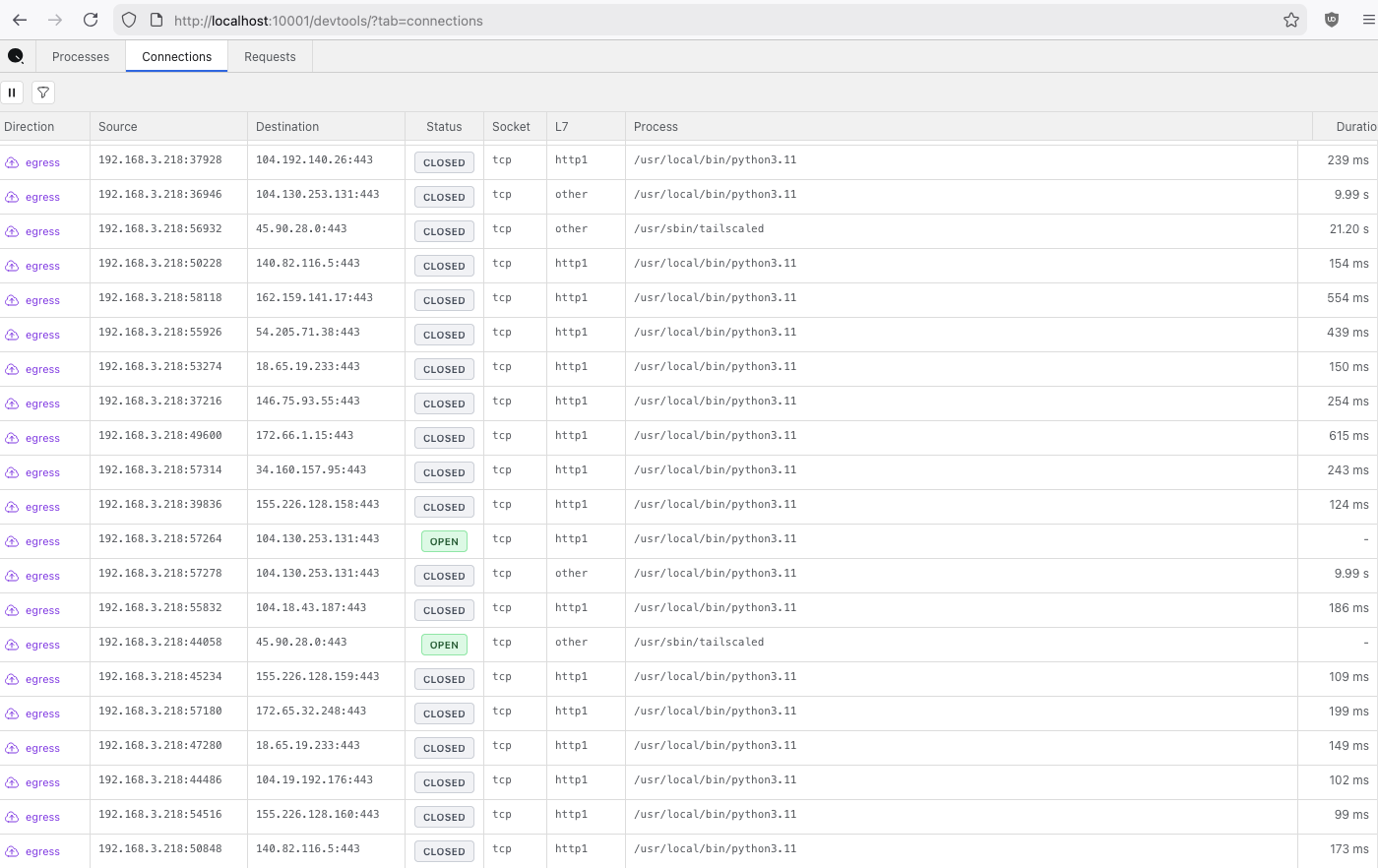
We're excited to introduce **QTap DevTools** - a browser-based interface that brings the familiar network tab of Chrome DevTools experience to server-side HTTP/S traffic debugging. It captures network traffic at the kernel level, and when the protocol is understood, is able to extract and present the payload. See exactly what your applications are sending and receiving in production, without code changes, proxies, or certificate management.
**DevTools is designed for single-host emergency troubleshooting** - when you need to debug a specific server right now. It runs locally on `localhost:10001`, requires no service restarts, and keeps all captured data on your infrastructure.
{% hint style="success" %}
**Available Now**: DevTools is included in the latest qtap release. Enable it with `--enable-dev-tools` or `ENABLE_DEV_TOOLS=true`. **No application restarts required.**
{% endhint %}
***
## The Problem We Solved
Production API debugging has always been painful:
* **Third-party API failing?** Your logs don't show the full request/response context
* **Integration broke overnight?** Need to add logging, deploy, and wait for the issue to reproduce
* **Which service made that call?** Multiple containers on the same host, impossible to tell
* **HTTPS traffic is encrypted** - tcpdump and Wireshark only show encrypted packets
Traditional solutions require proxies, certificate installation, application restarts, and code changes. **DevTools eliminates all of that.**
***
## What It Does
DevTools gives you a **real-time, browser-based view** of all HTTP/S traffic on a single host - ingress and egress, plaintext and TLS.
**This is emergency troubleshooting, not monitoring.** DevTools runs locally on the server you're debugging. When you need to see what's happening on a specific host right now, enable DevTools and watch traffic flow in real-time. No service restarts. No code deployments. No waiting.
### Key Capabilities
#### 1. See Inside HTTPS Without Proxies
DevTools uses eBPF to hook into TLS libraries (OpenSSL, Go crypto, Java SSL, Node.js) **before encryption happens**. You see the plaintext HTTP request/response even though the wire traffic is encrypted.
**No certificate management. No proxy configuration. No application changes.**
#### 2. Process & Container Attribution
Every HTTP request shows:
* Exact binary path (`/usr/local/bin/python3.11`)
* Container name and image (`payment-service:latest`)
* Process ID and user
When you see a failing API call, you instantly know **which container made it**.
#### 3. Complete HTTP Transaction Details
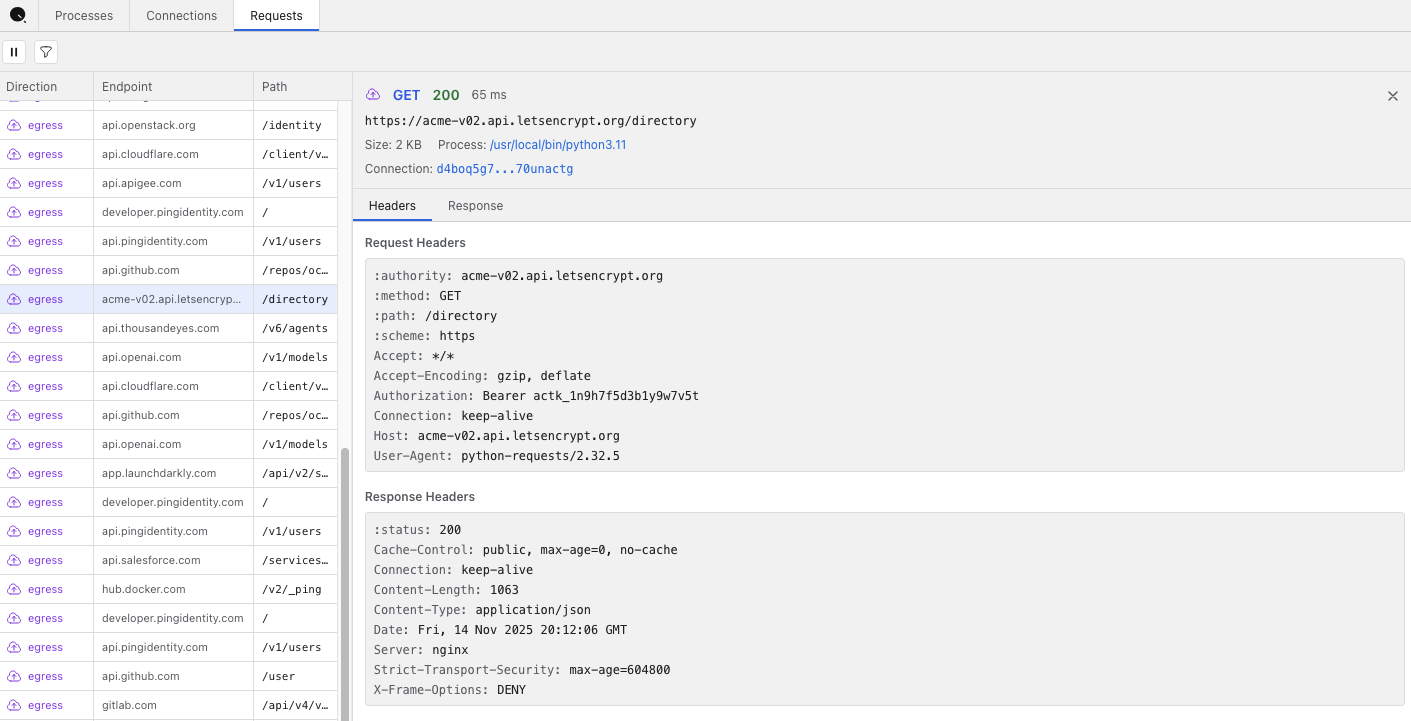
Click any request to see:
* **Request**: Method, URL, all headers (including `Authorization`), full body
* **Response**: Status code, content-type, all headers, full body
* **Timing**: Duration in milliseconds, exact timestamps
* **Network**: Bytes sent/received, TLS version, connection ID
#### 4. Real-Time Streaming
New requests appear instantly as they happen via Server-Sent Events (SSE). Watch traffic flow in real-time, filter by domain, status code, or process.
***
## Use Cases
### API Integration Debugging
**Problem:** Stripe API returning 401 errors. Your logs show "authentication failed" but not what header was sent.
**DevTools Solution:** Open DevTools, trigger the request, click on the failed call. See the exact `Authorization: Bearer sk_test_...` header that was sent. Discover you're sending a test key in production.
**Time to resolution:** 30 seconds instead of hours.
***
### Production Incident Response
**Problem:** Customer reports sync failing in production. You need visibility NOW. Can't wait for a deploy cycle to add debug logging.
**DevTools Solution:**
1. SSH into the production server: `ssh user@prod-server`
2. Enable DevTools: `sudo qtap --enable-dev-tools` (takes 2 seconds, **no app restarts**)
3. Reproduce the sync failure
4. Watch it happen in real-time in DevTools at `http://localhost:10001/devtools`
5. See the actual error: "404 Not Found - endpoint was moved"
**Time to diagnosis: 30 seconds.** No code deployment. No service restarts. No waiting for issues to reproduce in logs.
***
### Multi-Container Attribution
**Problem:** Payment service logs show API calls to Twilio. But the payment service shouldn't be calling Twilio directly - that should go through the notification service.
**DevTools Solution:** Filter by process/container. See that the `payment-worker` container is indeed making direct Twilio calls. Unexpected dependency discovered.
***
### Third-Party Service Changes
**Problem:** Integration that worked yesterday is broken today. Did the provider change their API?
**DevTools Solution:** Compare current requests against historical captures. See the provider now requires a new `X-API-Version: 2` header that wasn't required before.
***
## Getting Started
### Step 1: Install Qtap
{% tabs %}
{% tab title="Linux Binary" %}
```bash
curl -s https://get.qpoint.io/install | sudo sh
```
This installs the `qtap` binary to your system path.
For manual installation, see [Linux Binary Installation](/getting-started/qtap/installation/linux-binary.md).
{% endtab %}
{% tab title="Docker" %}
```bash
docker pull us-docker.pkg.dev/qpoint-edge/public/qtap:v0
```
For detailed Docker setup, see [Docker Container Installation](/getting-started/qtap/installation/docker-container.md).
{% endtab %}
{% tab title="Kubernetes" %}
For Kubernetes deployments, install via Helm:
```bash
helm repo add qpoint https://charts.qpoint.io
helm repo update
helm install qtap qpoint/qtap --set devtools.enabled=true
```
For detailed Kubernetes setup, see [Helm Chart Installation](/getting-started/qtap/installation/helm-chart.md).
{% endtab %}
{% endtabs %}
***
### Step 2: Run with DevTools Enabled
{% tabs %}
{% tab title="Linux Binary" %}
```bash
sudo qtap --enable-dev-tools
```
Qtap starts capturing traffic immediately. DevTools is now accessible.
{% endtab %}
{% tab title="Docker" %}
```bash
docker run -d --name qtap \
--user 0:0 --privileged \
--cap-add CAP_BPF --cap-add CAP_SYS_ADMIN \
--pid=host --network=host \
-v /sys:/sys \
-v /var/run/docker.sock:/var/run/docker.sock \
-e TINI_SUBREAPER=1 \
-e ENABLE_DEV_TOOLS=true \
--ulimit=memlock=-1 \
us-docker.pkg.dev/qpoint-edge/public/qtap:v0 \
--log-level=info
```
The `-e ENABLE_DEV_TOOLS=true` environment variable enables the DevTools UI.
{% endtab %}
{% tab title="Kubernetes" %}
If you installed with `--set devtools.enabled=true`, DevTools is already enabled.
Port-forward to access DevTools locally:
```bash
kubectl port-forward pod/qtap-xxxxx 10001:10001
```
Replace `qtap-xxxxx` with your actual pod name from `kubectl get pods`.
{% endtab %}
{% endtabs %}
***
### Step 3: Access DevTools
Open your browser and navigate to:
```
http://localhost:10001/devtools
```
You should see the DevTools interface with three tabs: **Processes**, **Connections**, and **Requests**.
For remote servers, use SSH port forwarding:
```bash
# From your local machine
ssh -L 10001:localhost:10001 user@remote-server
# Then open in your local browser
open http://localhost:10001/devtools
```
***
## What Makes DevTools Different
### vs. tcpdump / Wireshark
* **Wireshark** shows encrypted packets and requires TLS keys to decrypt
* **DevTools** shows plaintext HTTP/S automatically by hooking TLS libraries
### vs. Proxy Tools (Charles, mitmproxy)
* **Proxies** require certificate installation, proxy configuration, and **application restarts**
* **DevTools** requires no configuration and **no restarts** - just the `--enable-dev-tools` flag
### vs. Application Logging
* **Logs** only show what developers explicitly logged, require code changes and redeployment
* **DevTools** captures complete HTTP/S traffic automatically, no code changes needed
### vs. Qplane
* **Qplane** is for centralized, multi-host, long-term visibility across your entire fleet
* **DevTools** is for **single-host emergency troubleshooting** - when you need to debug one specific server right now
Think of DevTools as your emergency diagnostic tool. When a specific server is having issues, SSH in, enable DevTools, and see what's happening locally in real-time. For ongoing monitoring across your fleet, use Qplane.
**Use both together:** DevTools for emergency debugging + [S3 storage](/getting-started/qtap/configuration/storage-configuration.md) for permanent archives + Qplane for fleet-wide visibility.
***
## Key Features
### No Service Restarts Required
Enable DevTools while your applications are running. No restarts, no downtime, no waiting.
### Single-Host Local Operation
Runs on `localhost:10001` for emergency troubleshooting on a specific server. All data stays local.
### Process-Aware Traffic Capture
Not just IP:port - see the actual binary, container name, and image that made each request.
### Passive Observation
Out-of-band operation. Qtap observes traffic but doesn't route, proxy, or modify it.
### Plaintext TLS Inspection
See inside HTTPS by hooking TLS libraries before encryption, without certificates or proxies.
### Real-Time Streaming
Server-Sent Events (SSE) provide instant updates - no polling, no lag.
### Ring Buffer Storage
Finite, browser-based storage for ephemeral troubleshooting sessions. Perfect for emergency diagnostics.
***
## Data Sovereignty
**This is a key reason to use DevTools with local storage instead of sending everything to the cloud.**
Captured HTTP traffic often contains sensitive information:
* API keys and tokens in `Authorization` headers
* Customer PII in request/response bodies
* Internal service credentials
* Business-critical data
DevTools keeps all of this data:
* On your server (`localhost:10001`)
* In your browser's memory (ring buffer)
* Never sent to external services
* Ephemeral
For permanent storage, configure [S3-compatible object storage](/getting-started/qtap/configuration/storage-configuration.md) (MinIO, AWS S3, GCS) to keep captured data entirely within your infrastructure.
***
## Feedback
We'd love to hear how you're using DevTools! Share your use cases, feature requests, or bug reports:
* **GitHub Issues**: [qpoint-io/qtap](https://github.com/qpoint-io/qtap/issues)